
Mobile Pressure Filter Model
A physical industrial display model that presents the arrangement of a mobile pressure-filtration system
A mobile pressure filter model can make a trailer-mounted process system understandable without moving full-scale equipment into a meeting or exhibit. It should clarify layout and selected process relationships without being mistaken for an operating filter.

Technical Overview
Clarify What the Physical Model Represents
Pressure filtration separates solids from liquids by applying pressure across a filter medium. A physical display can represent the equipment and path involved in that process, but it does not need to circulate liquid or reproduce operating pressure to be useful.
The brief should say whether the model supports product sales, process explanation, training, or an exhibit demonstration. That purpose determines how much of the exterior remains intact and which internal zones, controls, or flow relationships need visual emphasis.
Establish the Mobile System Boundary

A mobile unit combines process equipment with a trailer or transport frame. The model should define whether it represents only the filter assembly or the complete mobile package, including the chassis, enclosures, access areas, and supporting components visible in the approved configuration.
Overall proportions and equipment placement are central to the story because mobility is part of the product identity. Current layout drawings and photographs help maintain those relationships when small utility lines or repeated hardware must be simplified.
Use a Cutaway to Reveal the Process Layout
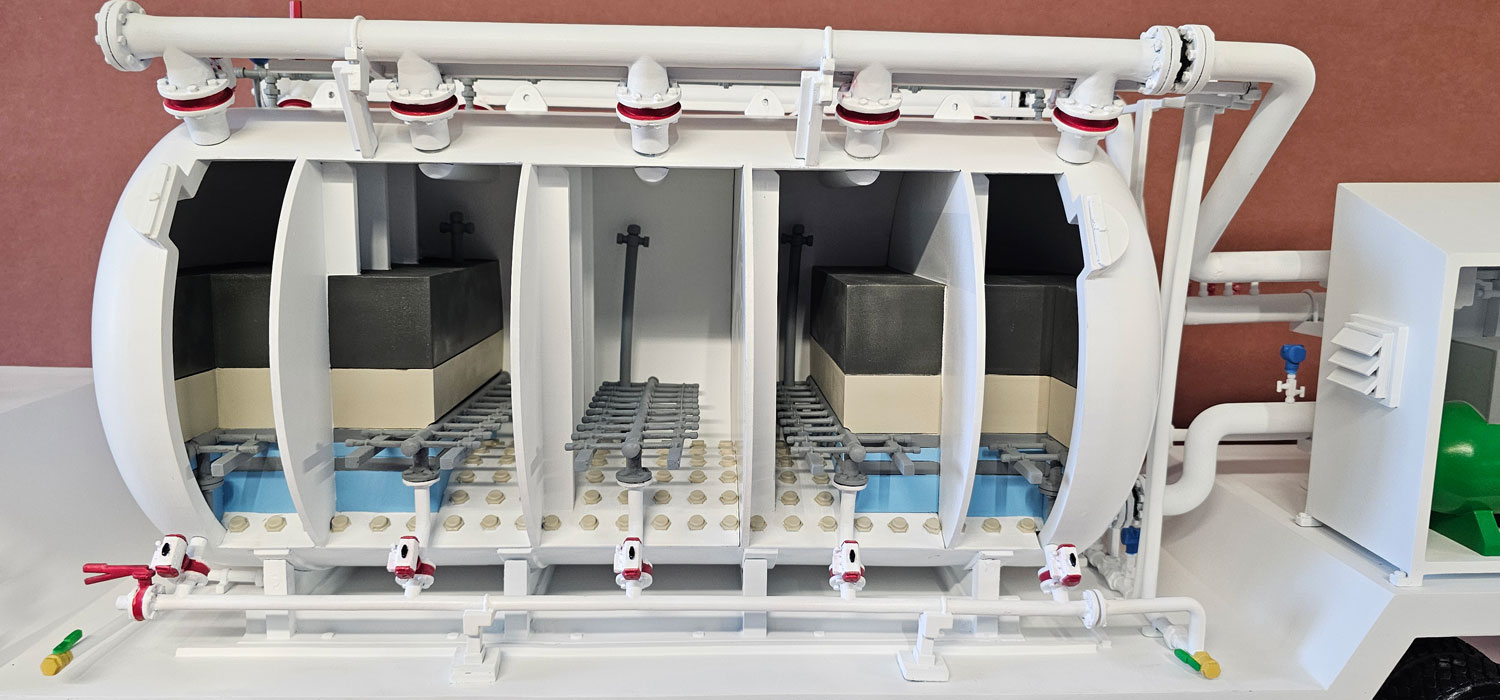
A cutaway can expose the filter chamber, internal equipment zones, or another selected portion of the trailer while retaining enough exterior context for the system to remain recognizable. The opening should follow the intended explanation rather than remove every enclosure surface.
Color coding, labels, transparent panels, or programmed lights may trace a simplified process path. These cues should be documented as presentation graphics and should not imply that the model validates capacity, separation performance, or field operating conditions.
Choose Scale for Layout and Legibility
The model must be large enough for the audience to distinguish the filter equipment from the trailer structure and to read any labels at the expected viewing distance. At the same time, the display needs a practical footprint for a table, pedestal, shipping case, or exhibit counter.
Very small tubing, valves, and structural members may be enlarged or represented selectively. Those adjustments should support the process explanation while preserving the overall mobile-system arrangement and the location of major equipment groups.
Build From Approved Technical References
Useful inputs include the current layout, CAD files, equipment schedules, exterior elevations, section drawings, product photography, color specifications, approved labels, and a clear list of components that may be shown publicly.
Review the exterior silhouette, cutaway boundary, process colors, label text, lighting sequence, base, and transport plan before fabrication. This keeps the display focused on the approved equipment configuration rather than on assumptions drawn from a generic filtration system.
Plan the Demonstration Around the Model
Decide who will present the model, which side faces the audience, whether power is available, and how it will be packed and set up. A short presentation sequence can reveal whether the chosen labels and visual cues support the intended explanation.
WhiteClouds can use the controlled equipment data and presentation requirements to develop a mobile pressure filter model that communicates system layout and selected process relationships clearly.
Plan a mobile process-equipment model
Review custom industrial model services and examples of equipment, cutaway, and process displays.
Tell us what your model needs to communicate
Share the intended audience, approximate size, level of detail, available source files, and project timeline.