
Planning a Giant Etch A Sketch Prop
A giant Etch A Sketch prop is defined by a wide red frame, a centered drawing screen, and two prominent control knobs. Its success depends on preserving those proportions while deciding whether the piece is a static display, a photo frame, or a separately scoped interactive installation.
Plan a Drawing-Toy Prop
Define what the screen is supposed to do
The screen decision changes the face layout, visitor position, and depth of the prop.
Static graphic
A printed or painted drawing can create the familiar screen appearance without visitor controls. The artwork should be supplied at the final aspect ratio.
Open photo frame
An opening can place visitors inside the display, which requires clear standing space and a camera view that includes both knobs and the outer frame.
Changeable panel
A replaceable face can support several messages or drawings. Panel access and the frequency of changes should be defined before fabrication.
Interactive request
If visitors must draw, turn controls, or trigger a digital response, describe the exact behavior, audience, duty cycle, and power conditions for separate feasibility review.
Protect the frame-to-screen relationship
The prop should not be enlarged by treating every feature equally. The screen remains the dominant rectangle, while the lower rail carries the two knobs and any face graphics. Give the overall width first, then test the resulting height, screen opening, and knob diameter against the people who will stand near it.
Rounded corners and a generous outer border make the silhouette readable across an aisle. If the display is photographed straight on, even small differences in left and right spacing become noticeable. A dimensioned front elevation is the best place to settle the screen opening, bottom rail, logo area, and base.
A wide shallow prop needs a base that supports the frame without becoming the main visual feature. Specify whether the base can extend forward or backward, whether it must sit against a wall, and whether floor anchoring is possible. Also identify nearby counters, shelving, railings, or booth walls that constrain the footprint.
For any visitor-facing controls, mark the intended hand height and the clear floor area in front. A photo-frame version needs a different opening height and may require access from the rear. If the piece travels, provide the smallest doorway and largest shippable component so the broad frame can be divided sensibly.
Use front views to resolve scale and placement
The two concepts keep the object front-facing, which is useful for comparing base depth, screen height, and the amount of surrounding retail space. They do not depict a completed WhiteClouds project. Final geometry and artwork should come from the buyer's approved reference package.
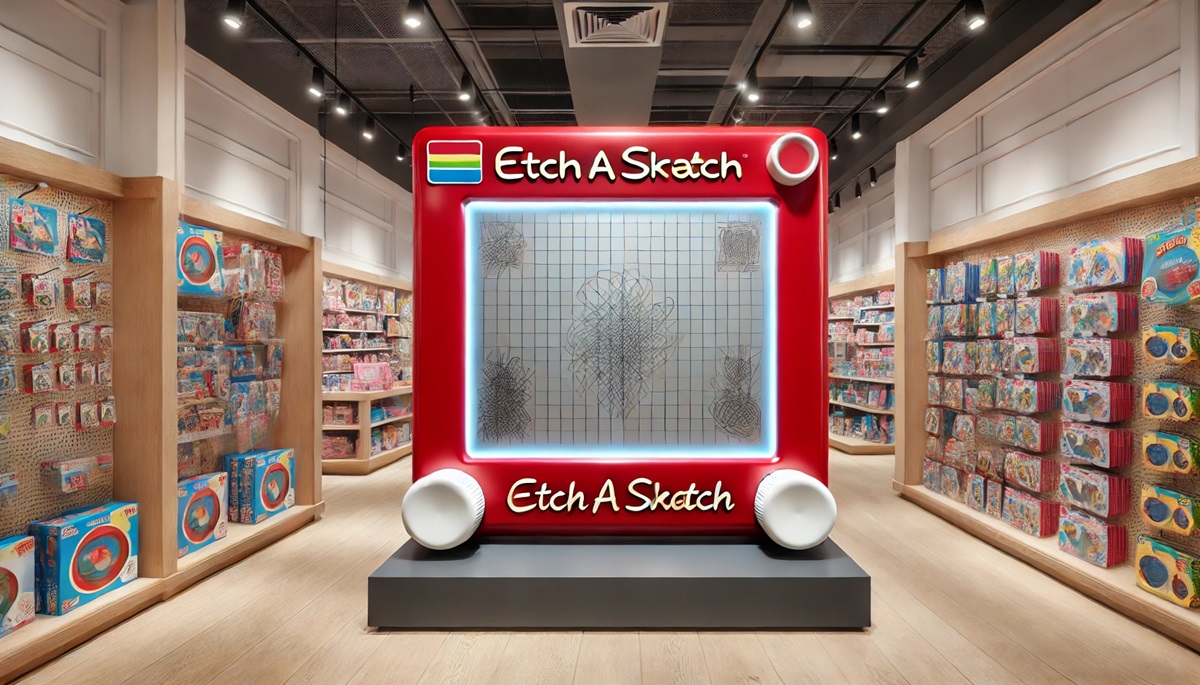
Details that make the first drawing-toy concept useful
The interaction level and face dimensions matter more than generic event descriptions.
- Overall width, height, and allowable depth
- Static, photo-frame, changeable, or interactive screen
- Approved front-face artwork and color references
- Knob size and whether visitors touch them
- Base footprint and anchoring limits
- Primary camera or viewing distance
- Venue access and electrical conditions
- Delivery location and in-use date
Request a quote for a giant Etch A Sketch prop
Send the target dimensions, screen behavior, approved artwork, knob requirements, base limits, interaction plan, site access, destination, and deadline. Include power or repeat-setup needs only when they are part of the intended display.