
Hydraulic Impact Hammer Models
Scaled physical replicas of hydraulic impact hammer equipment for exhibits, demonstrations, and technical presentations
A hydraulic impact hammer model can bring the profile and key component relationships of large equipment into a space where the full machine cannot go. The model should be designed around what an audience needs to recognize, compare, or discuss.
Technical Overview
Define the Demonstration Objective
Hydraulic impact hammers are large pieces of equipment, so a physical replica is most useful when it has a specific communication job. It may need to establish overall scale, identify major assemblies, support a sales conversation, or show where the tool interfaces with related machinery.
Write that objective before selecting model size or features. A display intended for an exhibit aisle may prioritize silhouette and branding, while a close technical discussion may require labels, a sectional view, or distinguishable working groups.
Preserve the Recognizable Equipment Geometry
The hammer body, impact head, hydraulic elements, connection points, and supporting structure create the equipment's recognizable form. Current CAD files or dimensioned drawings help maintain those proportions when the machine is reduced or enlarged for display.
Small fasteners and repeated details do not always survive a change in scale. They can be simplified when doing so does not alter the product identity or obscure a key relationship. The approved geometry should make clear which components are literal and which are presentation abstractions.
Choose a Practical Display Scale
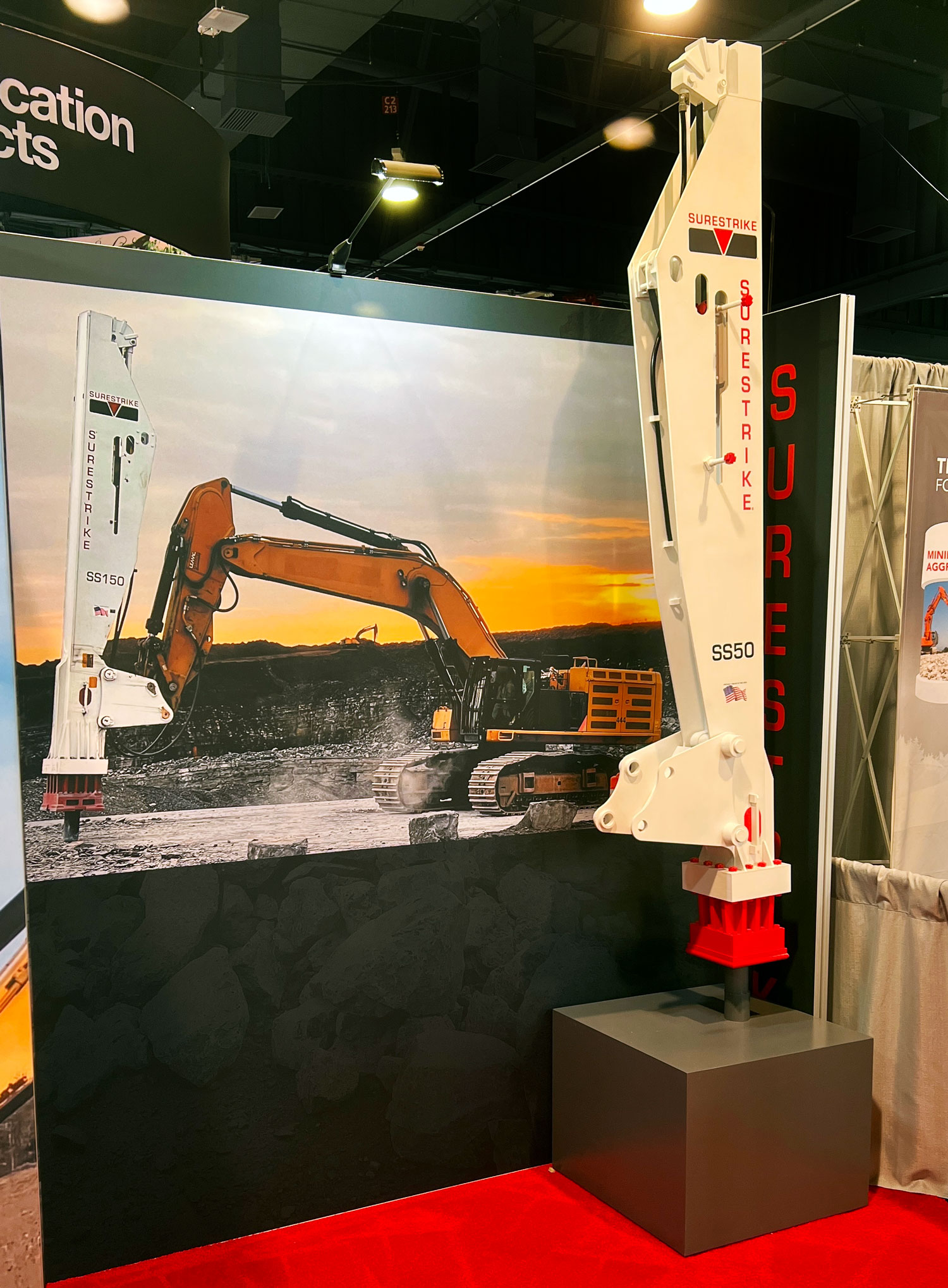
The documented WhiteClouds replica demonstrates that a model can remain substantial even when it is far smaller than the full equipment. Finished height should be based on venue access, intended viewing distance, base size, transportation, and the level of detail that must remain visible.
A tall floor display needs a stable presentation plan and sufficient clearance around it. A smaller tabletop model requires stronger visual hierarchy so the important interfaces and operating groups are still apparent without an audience standing extremely close.
Use Color, Labels, and Sections to Explain
Color can separate assemblies or reproduce the manufacturer's finish and identity. Labels should be used selectively and placed where they do not hide the equipment form. A cutaway is useful only when an internal relationship is central to the presentation.
Mechanical motion or lighting may be considered when it explains a defined concept, but neither should be implied by default. A static model can be effective when scale, geometry, finish, and the presentation script are coordinated carefully.
Supply the Right Reference Package
Useful inputs include current CAD, elevations, dimensions, product photography, color specifications, logo files, component names, and any views that must remain visible. The package should identify the exact equipment variant and the revision represented by the model.
Also state where the model will be displayed, how it will travel, who will assemble it, and whether it needs a case, base, labels, removable sections, lighting, or power. These requirements affect the model architecture and should be reviewed before production.
Review the Model as a Communication Tool
Approval should consider more than resemblance. Check that the intended audience can identify the product, locate the selected components, read any labels, and understand the relationship the model was commissioned to explain.
WhiteClouds can translate the controlled equipment references into a physical hydraulic impact hammer replica sized and finished for its actual presentation setting.
Develop an industrial equipment replica
Review WhiteClouds industrial model services and completed equipment-model examples.
Tell us what your model needs to communicate
Share the intended audience, approximate size, level of detail, available source files, and project timeline.