
How to Build a Scale Architectural Model Home or Building
Custom physical architectural models developed from plans and digital files
A scale architectural model turns drawings into a physical reference that a design team, client, or reviewer can examine together. The right scale, source files, and level of detail depend on the decisions the model needs to support.
Technical Overview
Define What the Model Needs to Show
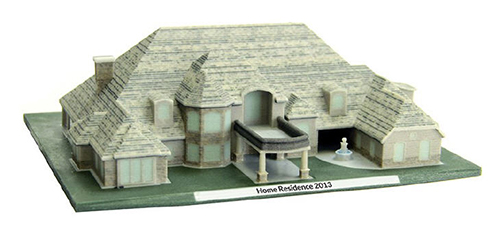
A scale architectural model is a reduced physical representation of a home, building, or site. It can show the exterior form, the arrangement of rooms, the orientation of windows, or the relationship between a structure and its surroundings. Before fabrication begins, identify which of those relationships the audience must be able to understand.
The model does not need every detail contained in the construction documents. A homeowner may need to compare room locations and exterior views. An architect or developer may need a clear presentation of massing, site position, and circulation. Defining that purpose first keeps the model focused and prevents small details from competing with the information that matters.
Start With the Available Design Files
Professional floor plans, elevations, sections, PDF files, traditional paper blueprints, and three-dimensional model files can all provide useful source information. A digital file such as an STL may supply geometry directly, while two-dimensional plans require interpretation before the physical parts can be produced.
The source package should be internally consistent and should identify the current design revision. Include dimensions, the site area to be represented, and any exterior or interior features that must remain recognizable. When information is missing or conflicting, resolving it before production is more reliable than trying to infer it from an incomplete drawing set.
Choose Scale and Level of Detail
Scale determines how much of the project can fit within the finished display and how small its readable details will become. A site model may need a broad footprint with restrained building detail. A model of one home can use a larger scale to show windows, walls, roof forms, and selected interior spaces more clearly.
Choose the level of detail around the viewing distance and the questions the model must answer. Exact scale dimensions are important, but visual hierarchy matters too. Major walls, openings, circulation paths, and site relationships should remain legible instead of disappearing beneath decorative features.
Plan Removable and Interior Features
Some architectural models are intended to be viewed only from the exterior. Others benefit from a removable roof, a removable upper story, visible interior walls, or another sectional treatment. These features can help an audience understand room arrangement and vertical relationships, but they also affect how the model is divided and assembled.
Decide early which parts, if any, need to lift off or separate. Also identify whether the base needs labels or other presentation information and whether full color is useful for distinguishing materials, landscape, rooms, or building zones. Those decisions belong in the fabrication plan rather than being added after the model is built.
Select a Fabrication Approach
Architectural models can be made with cardstock, wood, plastics, foam, 3D-printed components, or a combination of methods. Straightforward planes and repeated shapes may suit cut and assembled parts, while 3D printing can reproduce complex geometry prepared from the design files. The useful method depends on scale, geometry, detail, finish, and how the model will be handled.
Material choices should support the finished model's purpose. A presentation model may call for a resolved color and surface treatment, while a planning model may work better with a simpler palette that keeps the building form and spatial relationships easy to read.
Prepare the Project Brief
A useful request identifies the intended audience, the building or site area to include, the desired finished dimensions or scale, the required level of detail, and the available source files. It should also list removable sections, interior views, color requirements, base or labeling needs, display conditions, and the project timeline.
With those decisions established, WhiteClouds can evaluate the source material and plan a physical architectural model around the specific information it needs to communicate.
Plan a custom architectural model
Review WhiteClouds architectural model capabilities and browse examples of completed custom models.
Tell us what your model needs to communicate
Share the intended audience, approximate size, level of detail, available source files, and project timeline.